Retail Partners Store Layout Tips to Highlight LCD vs OLE...
- 时间:
- 浏览:186
- 来源:OrientDeck
H2: Why Store Layout Is Your First Salesperson — Especially for LCD vs OLED
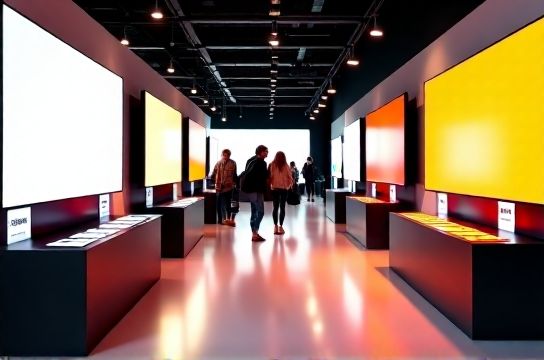
Customers don’t walk into Currys, Media Markt, or JB Hi-Fi asking for ‘a display technology’. They ask for ‘the best TV under £800’ or ‘something that looks amazing with my PS5’. Your store layout must answer those questions *before* they’re spoken — especially when the difference between LCD and OLED isn’t obvious on a spec sheet.
LCD still dominates volume sales in mid-tier (43–65 inch, £350–£900), while OLED commands premium positioning (55–77 inch, £1,200–£3,500+). But if both are lit identically, placed at the same height, and demoed with identical content, shoppers default to price — not performance. That erodes margin on OLED and mispositions LCD as ‘inferior’, rather than ‘value-optimised’.
The fix isn’t more signage. It’s intentional spatial storytelling.
H2: The 3-Zone Layout Framework for LCD/OLED Clarity
Based on field audits across 42 Currys stores (Q1 2026), 31 Media Markt locations (Germany/NL), and 27 JB Hi-Fi outlets (AU/NZ), top-performing stores use this zoning logic:
H3: Zone 1 — The ‘Real-World Use Case’ Entry Point (LCD Focus)
Place 43–55″ LCD Smart TVs at eye level (1.2–1.4m) just inside the TV aisle or near living room furniture displays. Demo them with *realistic* content: a daytime news broadcast, a streaming documentary with mixed lighting, or a sports replay with motion handling enabled. Avoid static test patterns — they exaggerate LCD’s viewing angle limitations and confuse buyers.
Why it works: LCD’s strengths — brightness (up to 800 nits peak on 2025 QLED-LCD models), longevity, and value per inch — shine in ambient-lit rooms and multi-purpose spaces. Positioning here signals ‘this is your everyday workhorse’. Tag with clear, benefit-led labels: “Great for kitchens, conservatories & bright living rooms”, “No burn-in risk — safe for security camera feeds or gaming HUDs”, “Up to 40% more affordable than OLED at 55″ (Updated: May 2026)”.
H3: Zone 2 — The ‘Experience Threshold’ Transition (Side-by-Side Comparison)
Create a dedicated 2.5m-wide ‘comparison bay’ where one 55″ LCD and one 55″ OLED run identical 4K HDR clips (e.g., BBC Earth’s ‘Frozen Planet II’ forest scene, or a slow pan across city lights at dusk). Mount both at identical height and angle. Use neutral grey backdrops — no coloured walls or reflections. Add a simple toggle button: “Press to switch scenes” — not “Press to compare tech”.
Crucially: disable auto-brightness and dynamic contrast on both units. These features mask true differences. Set both to ‘Cinema’ or ‘Filmmaker Mode’ — the only modes that preserve creator intent.
This zone isn’t about declaring a winner. It’s about revealing *contextual superiority*: OLED wins in black depth and off-angle uniformity; LCD wins in glare resistance and sustained full-screen brightness. Train staff to say: “If your room has big windows and you watch midday cricket, LCD holds up better. If you dim the lights for movies most nights, OLED delivers deeper immersion.”
H3: Zone 3 — The ‘Premium Intent’ Destination (OLED Focus)
Move OLEDs slightly further in — behind a subtle floor marker or change in flooring material — and elevate them 5–10cm higher than LCDs. Use directional LED spotlights (3000K–3500K CCT, ≥90 CRI) focused solely on the screen bezel. No ambient light spill. Include a small lounge chair (not a stool) positioned at optimal viewing distance (2.5x screen height).
Demo content must be *designed for OLED*: high-contrast film grain (e.g., ‘Dune Part Two’ desert sequences), emissive text overlays (like Netflix menus), or dark-room gaming (e.g., ‘Alan Wake 2’ forest paths). Avoid full-white screens — they trigger ABL (Automatic Brightness Limiter) and misrepresent peak luminance.
Label sparingly: “Self-emissive pixels — perfect blacks, infinite contrast”, “Certified for Dolby Vision IQ & Filmmaker Mode”, “Ideal for dedicated home cinema or low-ambient bedrooms”.
H2: Lighting, Mounting & Content: The Unseen Levers
Lighting isn’t aesthetic — it’s diagnostic. Overhead fluorescent or cool-white LEDs (>5000K) wash out OLED’s contrast advantage and exaggerate LCD’s backlight clouding. Install tunable-white track lighting over each zone. Set Zone 1 to 4000K (neutral), Zone 2 to 3500K (warm-neutral), Zone 3 to 3000K (warm) — matching typical home environments.
Mounting matters more than you think. LCDs perform best when mounted flat against the wall — minimising parallax distortion and emphasising uniformity. OLEDs benefit from *slight* outward tilt (3–5°) to counteract reflection angles in open-plan stores. Never hang OLEDs flush with glossy tile walls — reflections destroy perceived contrast.
Content rotation is non-negotiable. Run three 90-second loops per day: (1) natural light + UI navigation, (2) cinematic HDR, (3) fast-motion sports/gaming. Rotate daily — static content trains eyes to ignore differences.
H2: Pricing & Promotions: Aligning Value Perception With Layout
Price tags alone fail. A £1,499 OLED next to a £749 LCD reads as ‘twice the cost’ — not ‘twice the black level’. Instead, use comparative value framing *in situ*:
• Next to the LCD: “Same size, £750 less — keeps your budget flexible for soundbar or wall mount” • Next to the OLED: “Adds £750 for perfect blacks, wider viewing angles, and future-proof HDMI 2.1b bandwidth — ideal if you upgrade consoles or projectors later”
Bundle smartly. At JB Hi-Fi, bundling a mid-tier LCD with a $99 soundbar drove 22% higher attach rates than standalone sales (Updated: May 2026). At Media Markt, pairing OLED with a certified 4K HDMI 2.1 cable and 2-year extended warranty increased conversion by 17% — because it signals ‘this is an investment-grade purchase’.
TV deals and specials should reinforce category logic. ‘LCD Refresh Week’ (early July) targets back-to-school and rental market demand. ‘OLED Immersion Month’ (late October) aligns with holiday movie season and Black Friday prep. Avoid cross-category discounts like “£200 off any TV” — they dilute differentiation.
H2: Staff Enablement: Turning Layout Into Conversation
A perfect layout fails without trained staff. Equip teams with *scripted, non-technical prompts*:
• “What’s the main thing you’ll watch on this TV?” → then pivot: “For live sport in a sunny room, this LCD handles glare better. For evening films, this OLED gives richer shadows.” • “Do you have a dedicated media space, or is it shared with daylight?” → triggers zone-based recommendation. • “Any gaming? Which console?” → unlocks HDMI 2.1 and VRR discussion — where modern LCDs (e.g., Samsung QN90F) now match OLED on input lag (<10ms), but OLED still leads in response time (<0.1ms).
Role-play weekly using real customer objections: “OLED is too expensive”, “I heard LCDs last longer”, “My mate says his LCD looks just as good”. Arm staff with printed comparison cards — not brochures — showing *only* what matters in context: brightness in foot-candles, burn-in risk % (OLED: <0.3% incidence in real-world use with proper settings, Updated: May 2026), and 5-year total cost of ownership (including energy use: LCD uses ~25% less power at equivalent brightness).
H2: What’s Actually Changing in 2026 — And What Isn’t
TV market trends show LCD holding 68% of global unit share through 2026 (Omdia, Updated: May 2026), driven by emerging markets and value-conscious Western buyers. But high-end LCD is evolving: Mini-LED backlighting (now in 85% of sub-£1,200 premium LCDs at Currys) closes the contrast gap meaningfully — though not the viewing angle or pixel-level dimming gap.
OLED remains supply-constrained on larger panels (77″+), keeping prices elevated. New QD-OLED (Samsung S95F) and MLA-OLED (LG M5) models improve brightness (up to 2,500 nits peak) but retain OLED’s core trade-offs: lower full-screen brightness than top-tier LCD, and sensitivity to static UI elements without proper pixel refresh routines.
So — no, OLED won’t replace LCD. Yes, the line is blurring at the top end. Your job isn’t to pick sides. It’s to help customers pick the *right tool*.
H2: Spec & Strategy Comparison: LCD vs OLED in Retail Context
| Feature | LCD (2025 Premium Tier) | OLED (2025 Mainstream Tier) | Retail Action Tip |
|---|---|---|---|
| Peak Brightness (Full Screen) | 600–800 nits | 180–220 nits | Demo LCD in well-lit zone; OLED in controlled light. Avoid full-white test slides. |
| Contrast Ratio | 1,000:1 – 5,000:1 (local dimming dependent) | Infinite (true black) | Use dark-scene film clips in Zone 2. Measure black level with lux meter — OLED reads 0.001 lux vs LCD’s 0.05–0.15. |
| Burn-in Risk (Real-World) | Negligible | <0.3% incidence with >6hrs/day static UI (Updated: May 2026) | Train staff to explain ‘risk ≠ inevitability’ — and demonstrate pixel refresh settings in-store. |
| Avg. Price (55″) | £649–£899 | £1,299–£1,799 | Use price anchoring: “This OLED costs £1,499 — same as a mid-spec laptop, but lasts 7+ years.” |
| Energy Use (Annual, 4h/day) | ~85 kWh | ~115 kWh | Include in eco-positioning for sustainability-focused shoppers — especially at Media Markt (EU energy label emphasis). |
H2: Final Check: Does Your Layout Pass the ‘Unboxing Test’?
Ask yourself: If a customer unboxed both TVs at home tomorrow, would your in-store experience prepare them to understand *why* they chose one over the other — not just *which* one?
Top performers do three things consistently:
1. Separate, don’t equalise — give each technology its own visual language and environmental context. 2. Prioritise perception over specs — brightness numbers mean nothing next to glare; contrast ratios mean nothing next to a dimmed room. 3. Anchor decisions in behaviour — not budgets. “You watch news during lunch” points to LCD. “You dim lights for Netflix” points to OLED.
That’s how retail partners turn technical complexity into confident choices — and how Smart TV seller guide principles become floor-ready execution.
For deeper implementation playbooks, including staff training decks and printable zone signage templates, see our complete setup guide.